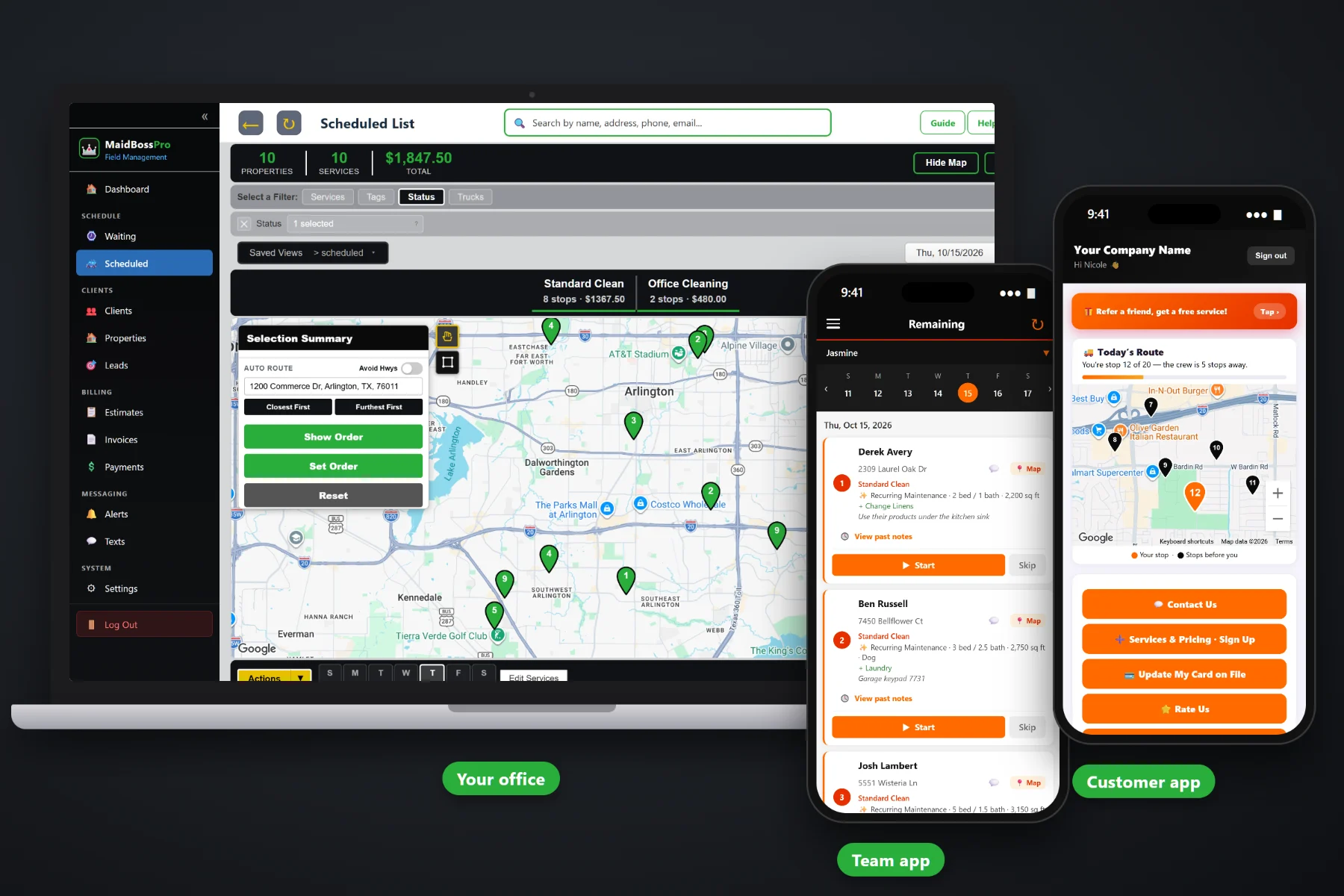
A cleaning day is a string of homes, and every home is different: a lockbox here, an alarm there, a dog that stays in the laundry room, a guest room the customer wants left alone. MaidBossPro puts the day's homes in route order on the team's phone, with one-tap navigation, the cleaning type, beds, baths, square feet, pets, extras and entry notes on every card, Start / Skip / Complete, before-and-after photos, automatic on-the-way and arrived texts, and a card-on-file charge when the clean is done.
Plans start at $59/month, and the team app is part of every plan. The route, navigation, cleaning details, entry notes, photos, customer texts, time clock and payment at completion come with the platform, not as an add-on. To see how the team app fits with recurring cleanings in fixed slots, the Waiting List for one-off work, routing and billing, start at MaidBossPro and then dig into the team's side here.
Each team sees its own homes in the order set on the dispatch board. Finish one house, glance at the next card, pack the caddies and go.
Every job card has a navigation button that opens directions to the address. Nobody types a street name with gloves on.
“Recurring Maintenance · 3 bed / 2 bath · 1,800 sq ft · Dog” under the address, with “+ Change Linens” and the entry notes right below.
Photos taken in the app stay with the job for the day someone asks whether the oven was really done.
On-the-way and arrived texts go out on their own. Customers pick their alerts, and replies go to the office.
Complete creates the invoice and can charge the card on file before the team pulls out of the driveway.
Whoever quoted the home already wrote down the bedrooms, bathrooms, square feet, pets, extras and how to get in. MaidBossPro keeps that on the job and puts it on the team's phone, so the team reads it once in the driveway instead of calling the office from the front porch. When the same home comes up again, the new job fills in from the last one.
Cleaners came to clean, not to fill out forms on a phone. MaidBossPro asks for a few taps per home and gives back the address, the job, the way in and fewer calls to the office. It runs in the browser on the iPhones and Android phones your team already carries, with no app store download.
Set up employees with a personal PIN, assign them to Team 1, Team 2 and so on, and add your customers with their beds, baths, pets, extras and entry notes.
Weekly, every-two-weeks and monthly homes keep the same day, time and team, with months of visits already on the team’s app. Deep cleans and move-outs wait on the Waiting List as one-time jobs.
The dispatch board sets each team's order, by hand or by auto-routing from the office, and the team's phone shows the same order.
Log in with company login and PIN, clock in, tap navigation, read the card, tap Start, take the photos, tap Complete.
Most field-service apps give a job an address and a notes box. A cleaning job is a type of clean, a count of bedrooms and bathrooms, a pet, a list of extras, a lockbox and an alarm. An app that only knows the address leaves half of every job on a paper sheet or in somebody's memory.
Ask any cleaning team lead how the day really runs and you will hear the same story: a printed schedule that changed before the first home, a door code buried in a group text, and a customer who asked for the inside of the fridge and nobody wrote it down. Whether the linens get changed this visit. Which product the customer wants on the hardwood. Which room stays closed. Whether anybody told the homeowner the team was on its way.
That information belongs on the job, not on a clipboard or in one cleaner's head. When it shows up on the phone, any team can clean any home and the office stops reading lockbox codes over the phone.
MaidBossPro keeps the job, the home, the address and the customer in one place, from the first estimate to the paid invoice.
Every tool here exists to get teams through a full day of homes with fewer phone calls, fewer missed extras and fewer trips back.
Cleaners sign in with your company login and a personal PIN, so every job, photo and clock-in belongs to the right person.
Each team sees its own homes in the order set on the dispatch board, and the list follows when the office moves a job.
One tap from the job card opens directions to the address.
Standard, deep, move-in / move-out, post-construction, recurring maintenance or office, on every card.
The size of the home and any pets, so the team knows what they are walking into.
Inside oven, inside fridge, interior windows, baseboards, cabinets, blinds, laundry, linens, dishes, walls and doors.
Lockbox, key or door code, alarm, rooms to skip and products to use, shown with the job.
Three buttons tell the office what is underway, what is done, and what was skipped and why.
Proof of the finished kitchen and bathrooms, saved with the job.
Sent automatically. Customers choose night before, when they are next, and when the team arrives.
In the customer app: "You're stop 12 of 20 — the crew is 5 stops away."
Complete creates the invoice and can charge the card on file. Office accounts can get one monthly statement.
Cleaners clock in and out, and log lunch and breaks, on the same phone.
Team locations show on the office map, so the office knows which team is closest.
Runs in the browser and installs to the home screen. No app store, no special devices.
Start $59, Pro $89 and Crew $199 per month, with the team app on every plan.
The team's list starts with its regulars. Weekly, every-two-weeks and monthly homes keep a fixed slot — same day, same time, same team — and every visit is already on the schedule, with the time on the card. The office books one-off work from the Waiting List onto a team and a day, auto-routes Closest First or Furthest First from the office, and the phone shows the same order. As teams tap Complete, the office sees homes done, photos attached and invoices created. For a full walkthrough of the team's day, read Maid Service App: The Complete Guide for Cleaning Companies and Their Teams.
A cleaning goes better when the customer knows it is happening. Automatic reminders the night before, on-the-way and arrived texts as the team works the route, and a live map in the customer app all tell the homeowner when to expect the team. Replies come back to the office through two-way texting, and when the clean is complete the invoice, online payment and card on file are all in the customer app.
Pick the plan that fits your company. Every plan starts with a 14-day free trial and no credit card.
Compare plans on the pricing page.
Their homes for the day in route order. Each card has the address with a navigation button, the cleaning type, bedrooms, bathrooms, square feet, pets, extras like inside the oven or change linens, and entry notes such as the lockbox, door code, alarm, rooms to skip and products to use. They tap Start, Skip or Complete, take before-and-after photos, and the customer gets automatic on-the-way and arrived texts.
No app store download. The app runs in the browser on iPhone and Android and can be installed to the home screen. Cleaners log in with your company login and their own personal PIN.
The office sees the job done with its photos and notes, the invoice is created, and a card on file can be charged. For a recurring client, the next visit is already on the schedule in the same slot, so nothing needs to be rebooked.
The team app needs a data connection to load the day, save photos and send updates. In homes with weak signal, teams usually open the next card before going inside, or step near a window or outside to finish a Complete.
No. A new job at a home you have cleaned before fills in from that home's last job, including beds, baths, pets, extras and the entry code, with a note saying so. If the code changes, update it once.
Start is $59/month, Pro is $89/month, and Crew is $199/month. The team app is on every plan, and every plan starts with a 14-day free trial with no credit card.
The team app is one piece of how MaidBossPro runs a cleaning company. For recurring cleanings, the Waiting List for one-off work, routing, office accounts and billing, see the full MaidBossPro platform overview.
Practical reading on installing and logging in, route order, navigation, the job card, entry notes, Start / Skip / Complete, photos, customer texts, payment at completion, the time clock, team GPS and onboarding new cleaners.
Homes in route order, cleaning details and entry notes on every card, before-and-after photos, automatic customer texts and payment at completion on every team's phone. Try MaidBossPro free for 14 days.