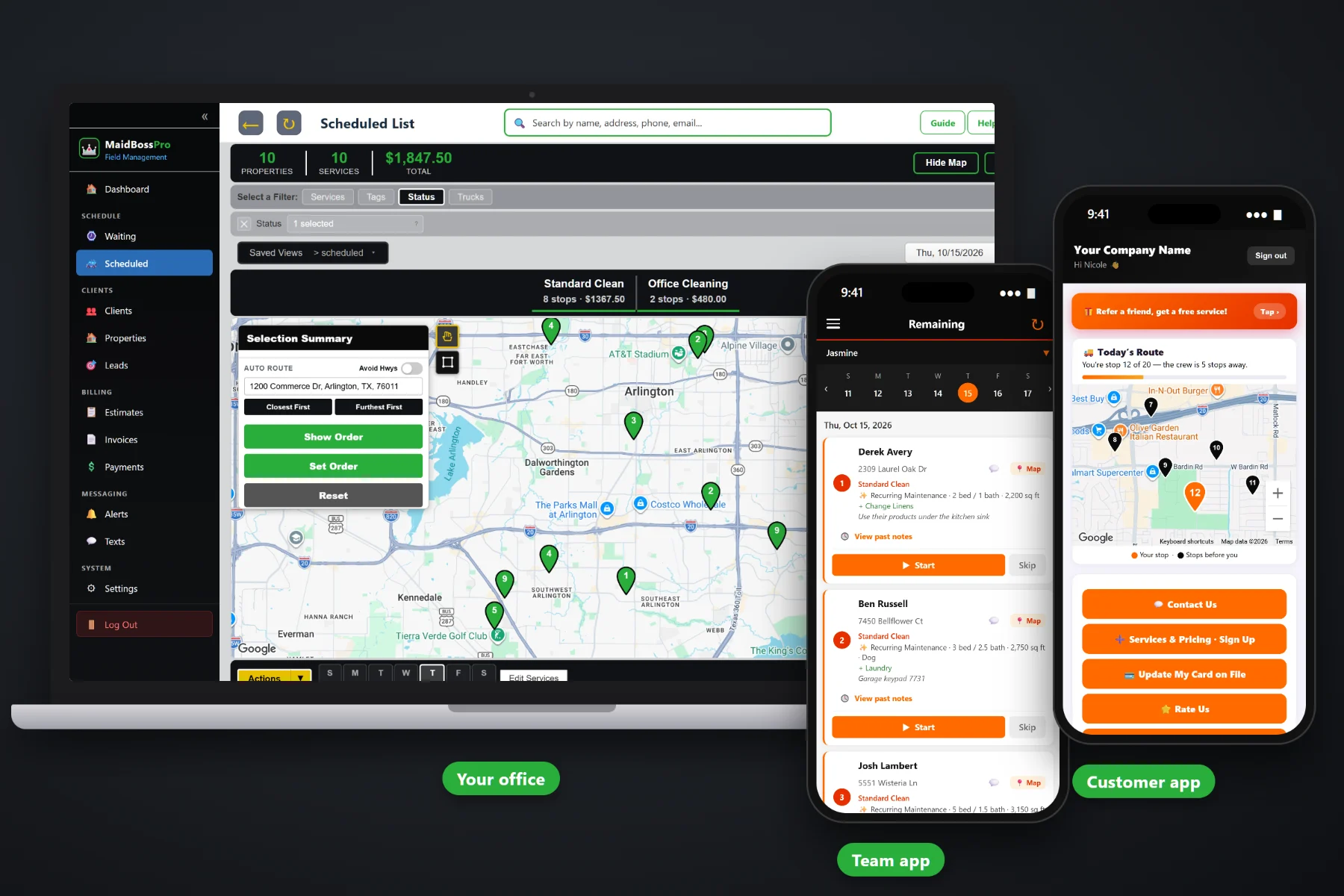
A maid service lives on its standing clients: the weekly family with three kids and a dog, the every-two-weeks couple who work from home, the monthly condo that just needs a reset. MaidBossPro gives each one a fixed slot — the same day, the same time and the same team — puts every visit for the next 3, 6 or 12 months straight onto the schedule, fills each visit in from the home's last cleaning, sends the reminders and charges the card on file when the team taps Complete.
Plans start at $59/month, and recurring cleanings are part of every plan. Fixed recurring slots, months of visits on the schedule, home details, reminders and auto-charge come with the platform, not as an add-on. To see how recurring work fits with estimates, the team app, routing and billing, start at MaidBossPro and then dig into the standing-client side here.
Weekly, every 2 weeks, every 4 weeks or monthly on the same date. Each client keeps the same day, the same time and the same team.
Add Recurring Cleaning puts every visit for the next 3, 6 or 12 months straight onto the Scheduled List and the team's app, with the time on the card.
A new visit fills in from the home's last cleaning: beds, baths, pets, extras and the entry code. Nobody re-types the lockbox.
Night-before, when-they're-next and arrived alerts by text and email, chosen by the client.
Photos from the team's phone stay with each visit, and clients can see them in the customer app when you turn it on.
Complete creates the invoice and can charge the card on file, so standing clients never get a stack of bills.
A recurring client's house does not change much from one visit to the next. Three bedrooms, two baths, a dog named Biscuit and a lockbox on the side door. MaidBossPro copies that from the last cleaning onto every visit in the series, with a note saying it was filled in, so the office checks it instead of retyping it and the team reads it on the phone in the driveway.
Most maid services run their standing clients out of a calendar, a spreadsheet and memory. MaidBossPro asks you to set each client's slot one time. After that, every visit is already on the schedule, the details carry over, and the office spends its morning booking work instead of hunting for who is next.
Enter clients by hand or with a CSV import. Imported addresses are placed on the map automatically, with beds, baths, pets and entry notes on each home.
Pick the home, service and price, the frequency, the first date, the time and the team, then schedule 3, 6 or 12 months ahead. Every visit goes straight onto the schedule.
The Recurring Cleanings list shows each slot and the next visit, and warns when a series is running out. Change, Extend 6 months or Stop it there.
The team taps Complete on the phone, the invoice is created, the card on file can be charged, and the next visit is already waiting in its slot.
Repeating calendar events look tidy until the first holiday, sick day or rescheduled Tuesday. After that, nobody is quite sure which homes were cleaned, which were moved, and which quietly fell off the schedule.
Ask any maid service owner about their standing clients and you will hear the same story: a repeating calendar entry that got dragged to Thursday and never dragged back, a lockbox code on a sticky note, and an every-two-weeks client who went five weeks without a cleaning before anyone noticed. Then the call comes, and it is not a happy one.
Recurring work is a promise: this home, this day, this time, this team. When software keeps that slot for you and puts every visit on the schedule months ahead, a series that is running out gets a warning before a client goes uncleaned.
MaidBossPro keeps the client, the home, the slot and every upcoming visit in one place, from the first deep clean to the hundredth maintenance visit.
Every tool here exists to keep weekly, every-two-weeks and monthly clients cleaned on time, by the team they know, and billed without chasing.
Weekly, every 2 weeks, every 4 weeks or monthly on the same date. The first cleaning date sets the weekday, and the time and team stay the same.
Choose 3, 6 or 12 months and every visit goes straight onto the Scheduled List and the team’s app, in route order, with the time on the card.
Change the team, day, time or price for all upcoming visits, Extend 6 months, or Stop a series. Finished visits stay as they are.
Deep cleans, move-in / move-out and post-construction jobs wait on the Waiting List until booked, then sit beside the standing schedule.
Beds, baths, square feet, pets, extras and entry notes fill in from the home's last cleaning.
Lockbox, key, door code, alarm, rooms to skip and products to use, shown under the address.
Team 1, Team 2 and so on. Each series has its own team, so the same faces go to the same homes.
Closest First or Furthest First from the office, or set the route order by hand. Print route sheets if you like paper.
Taken on the team app and saved with the visit, visible to clients in the customer app when you turn it on.
Night before, when they're next and when the team arrives. Clients choose which alerts they want.
Clients request service, update their card, see invoices, pay, rate and refer, and watch the route on a live map.
Charge the card on file when a cleaning is completed or on a schedule, with past-due follow-up.
A property manager or office on Monthly billing gets one statement covering every address.
Bring your client list over from a spreadsheet. Addresses land on the map automatically.
See your clients, jobs and invoices in reports, alongside tags and custom fields you set up.
Start $59, Pro $89 and Crew $199 per month, with recurring cleanings on every plan.
Every morning, your standing clients are already on the Scheduled List in their slots, with the time on each card, because their visits were placed there months ahead. The office fits one-off work from the Waiting List around them, auto-routes Closest First or Furthest First from the office, and the team's phone shows the same order. When a team taps Complete, the invoice is created, the card can be charged, and that home's next visit is already on the schedule. For the whole picture, read Recurring Cleaning Software: The Complete Guide to Running Weekly, Every-Two-Weeks and Monthly House Cleaning Clients.
A recurring client wants three things: to know when the team is coming, to see the house was done, and to never have to think about paying. Automatic reminders the night before, when they're next and when the team arrives cover the first. Before-and-after photos in the customer app, when you turn them on, cover the second. A card on file charged after each cleaning covers the third. Replies come back to the office through two-way texting, and service requests come in through the customer app.
Pick the plan that fits your operation. Every plan starts with a 14-day free trial and no credit card.
Compare plans on the pricing page.
On Recurring Cleanings, click Add Recurring Cleaning. Pick the home, the service and price, the frequency (weekly, every 2 weeks, every 4 weeks or monthly on the same date), the first cleaning date, the time and the team, and choose 3, 6 or 12 months. Every visit in that range goes straight onto the schedule and that team's app.
No. Recurring clients keep a fixed slot and their visits are already on the schedule. The Waiting List is only for one-off work waiting to be booked, like a new deep-clean or move-out request, an approved estimate or a web request.
No. A new job at a home you have cleaned before fills in from that home's last job, including bedrooms, bathrooms, pets, extras and the entry code, with a note saying it was filled in.
There is no pause button. You move that one visit to a later day or skip it from the schedule, and the rest of the series stays in its slot. To change the day, time, team or price going forward, use Change on the Recurring Cleanings list.
Yes. With a card on file, the card can be charged when the team taps Complete or on a schedule, and the invoice shows in the customer app. Past-due follow-up covers any card that fails.
Start is $59/month, Pro is $89/month, and Crew is $199/month. Recurring cleanings are on every plan, and every plan starts with a 14-day free trial with no credit card.
Recurring cleanings are one piece of how MaidBossPro runs a house cleaning company. For estimates, the team app, routing, office accounts and billing, see the full MaidBossPro platform overview.
Practical reading on frequencies, fixed recurring slots, scheduling months ahead, turning deep cleans into standing clients, home details, teams, add-ons, auto-charge, reminders, holidays, skips, vacations, price changes, cancellations and win-backs.
Fixed slots with the same day, time and team, months of visits already on the schedule, home details that carry over, reminders and auto-charge after each cleaning. Try MaidBossPro free for 14 days.