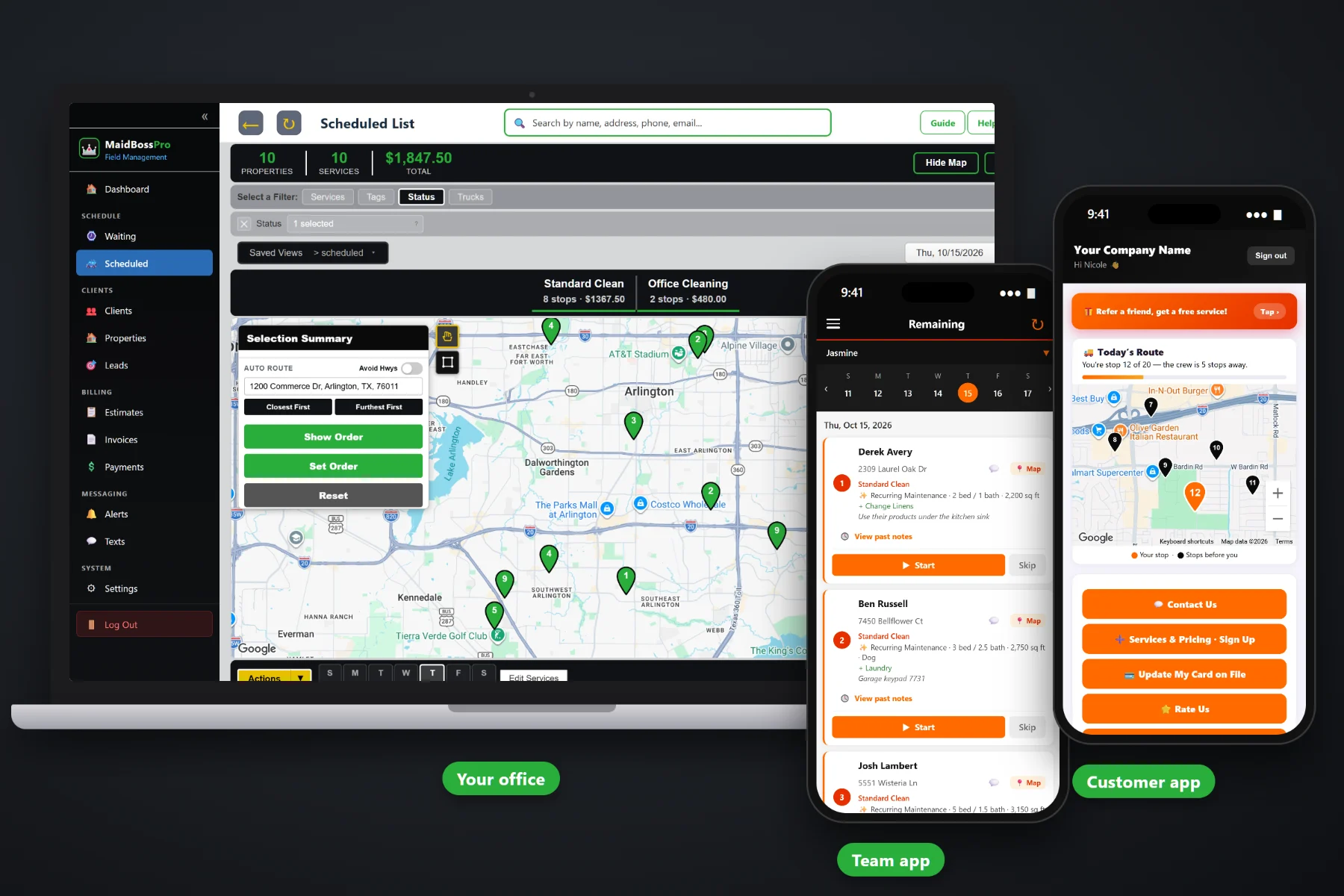
Most maid services pick up their first office account by accident. A customer runs a small insurance agency, a property manager needs a unit cleaned by Friday, a builder wants the dust gone before the walkthrough. MaidBossPro handles that work in the same place as your weekly homes: one account with many addresses, one monthly statement, entry and alarm notes on the team's phone, before-and-after photos for the manager, and quotes the client approves online.
Plans start at $59/month, and commercial accounts are part of every plan. Multiple addresses per client, monthly statements, entry notes, photos and online quote approval come with the platform, not as an add-on. To see how this fits with recurring home cleanings in fixed slots, the Waiting List for one-off work, routing and billing, start at MaidBossPro and then dig into offices, rentals and move-outs here.
A dental group with three clinics or a property manager with forty units is one client with every location underneath.
Set the account to Monthly and it gets a single statement each month, every line labeled with the address that was cleaned.
Lockbox, key, door code and alarm notes live on the address and show on the team's phone at every visit.
Before-and-after photos saved with the job, ready for the manager who was not there to see the empty unit.
Send the estimate, the client approves it online, and the approved estimate becomes the scheduled job.
Text office managers and property managers from the office, with replies in the same thread.
An office clean at 6pm and a move-out at 9am look nothing alike, but both start with the same questions: what kind of clean, how big, what extras, and how do we get in. MaidBossPro shows the answers under the address on the office lists and on the team's phone, so nobody calls the property manager from the hallway.
You do not need a separate janitorial program to clean four offices and a few move-outs a month. MaidBossPro treats an office or a rental unit like any other address, with a few extra pieces that business clients expect: several locations per account, a monthly statement, entry notes the team can trust, and photos that prove the work.
Create the client once, then add each office, clinic or rental unit as its own address with its own entry notes, rooms and square feet.
Build the estimate from your service list, send it, and let the office manager or property manager approve it online.
Weekly office visits get a fixed slot, like Tuesdays at 6:00 PM with Team 3, scheduled months ahead. Move-outs, turnovers and post-construction cleans wait on the Waiting List as one-time jobs.
The team works from the phone, takes before-and-after photos and taps Complete. Monthly accounts get one statement for every location.
A single homeowner is one name, one address and one card. A property manager is one name, dozens of addresses, a different lockbox at each one and a bookkeeper who wants one bill a month. That is the point where spreadsheets, paper and booking-form tools start to fall apart.
Ask any owner who has taken on rental and office work and you will hear the same story: a lockbox code in an old text thread, a move-out that got cleaned twice because two people booked it, a manager asking whether the oven was done in Unit 4B with no photo to show. A stack of separate invoices nobody at the management company wanted. An office alarm that went off at 7pm because the new team member never saw the code.
That information belongs on the address and the account, not in one person's head. When it shows up on the phone and on the statement, any team can take any unit and the client gets one clear bill.
MaidBossPro keeps the account, every location, every job and every invoice in one place, from the first quote to the paid statement.
Every tool here exists to help a residential cleaning company take on offices, property managers, rental hosts, realtors and builders without a second system.
One client with every office, clinic, unit or listing underneath, each with its own details and notes.
Office / Commercial, Move-In / Move-Out, Post-Construction, Deep Clean, Standard and Recurring Maintenance.
Bedrooms, bathrooms and square feet on the job, and pricing can tie to any of them.
Inside oven, inside fridge, cabinets, baseboards, blinds, interior windows and walls & doors show on the card.
Lockbox, key, door code, alarm, rooms to skip and products to use, under the address.
Recurring office visits keep the same day, time and team, with 3, 6 or 12 months of visits on the schedule.
Move-outs, make-readies, rental turnovers and post-construction cleans scheduled as one-off jobs.
Dispatch board by team and day, auto-route Closest First or Furthest First, and printable route sheets.
Taken in the team app and saved with the job, and shown on past visits in the customer app when you turn it on.
Accounts set to Monthly get one statement each month, every line labeled with its address.
Estimates from your service list, estimate templates, follow-up emails and online approval.
Text office managers, property managers, hosts and builders from the office.
Tag accounts by type and add fields like unit number, building or cost center.
See work and revenue by client so you know which accounts are worth the drive.
iPhone and Android in the browser, with a company login and personal PIN. No app store.
Start $59, Pro $89 and Crew $199 per month, with commercial accounts on every plan.
Weekly and every-two-weeks offices keep a fixed slot on the schedule next to your recurring homes — same day, same time, same team. Move-outs, make-readies and post-construction cleans wait on the Waiting List until you book them as one-time jobs. The office assigns each job to a team and a day, auto-routes from the office, and the team's phone shows the same order. For a full walkthrough of offices, rentals and move-outs, read Commercial Cleaning Software for Maid Services: The Complete Guide to Offices, Rentals and Move-Outs.
The person who hires you for an office or a rental is rarely standing in the room when you clean it. Before-and-after photos saved with each job show what was done. Two-way texting keeps the office manager or property manager in the loop without phone tag. And when the account is set to Monthly, the bookkeeper gets one statement covering every location instead of a pile of separate invoices.
Pick the plan that fits your operation. Every plan starts with a 14-day free trial and no credit card.
Compare plans on the pricing page.
No. It is built for residential cleaning companies that also take on small offices, clinics, property managers, rental hosts, realtors and builders. Large janitorial contracts with many buildings, nightly crews and supply contracts are outside its typical use, and we would rather tell you that up front.
Yes. One client can have many addresses, such as several offices or every unit a property manager handles. Each address keeps its own cleaning details, square feet, extras and entry notes.
Yes. Set the account to Monthly and it gets one statement each month covering every location, with each line labeled with the address that was cleaned.
As one-time jobs on the dispatch board, with the cleaning type set to Move-In / Move-Out and the bedrooms, bathrooms and extras on the job. Weekly or every-two-weeks office visits are set up as a recurring series instead, with a fixed day, time and team and every visit placed on the schedule months ahead.
No. Hosts and property managers send turnover requests by text, by email, through the customer app or through your website request form, and the office puts the job on the schedule.
Start is $59/month, Pro is $89/month, and Crew is $199/month. Commercial accounts work on every plan, and every plan starts with a 14-day free trial with no credit card.
Office and rental work is one piece of how MaidBossPro runs a cleaning company. For recurring home cleanings, the Waiting List for one-off work, the team app, quotes and billing, see the full MaidBossPro platform overview.
Practical reading on office accounts, after-hours routes, property managers, move-out and turnover cleans, rental hosts, realtors, builders, multi-location accounts, monthly statements, entry notes, photos, quotes and renewals.
Many locations per account, one monthly statement, entry and alarm notes on every phone, before-and-after photos and quotes approved online. Try MaidBossPro free for 14 days.